How to create your interval training
The constructor turns the text into an interval graph. Let's start with a 28-minute training example: it shows syntax and repetitions, rather than assigning a load for your preparation.
1. Insert an example and build a graph
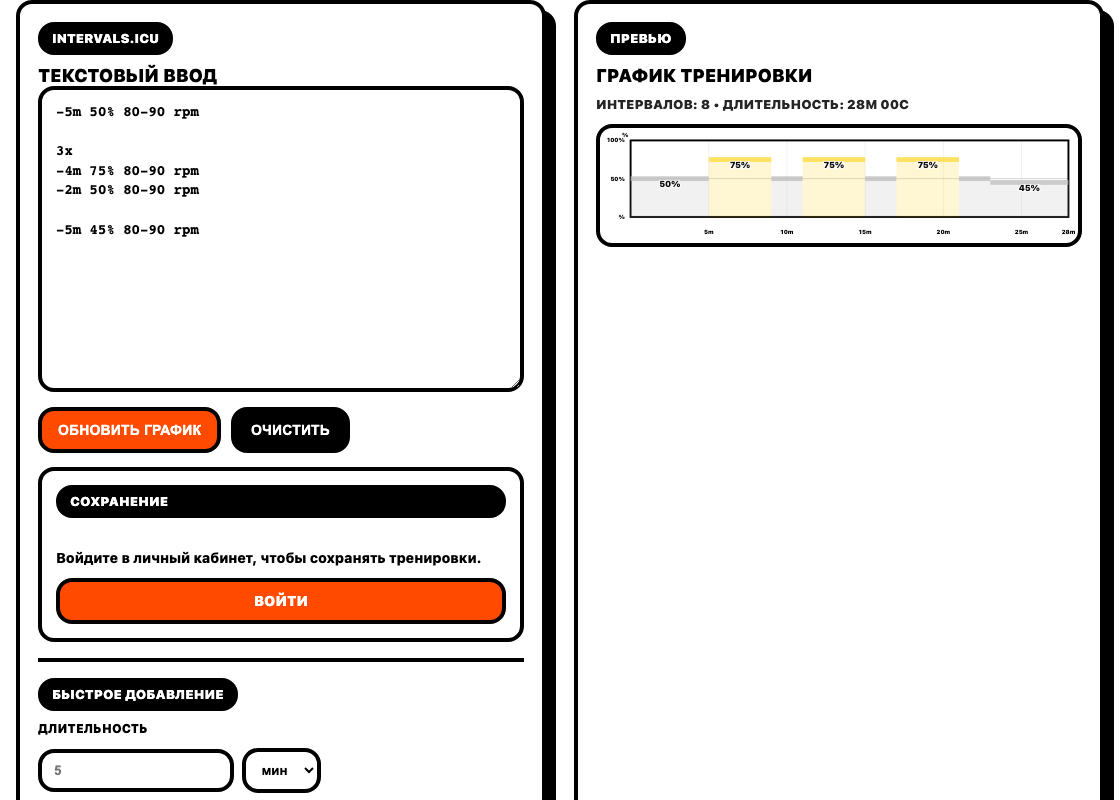
Open it constructor paste the text below into the "Text Input" and click "Update Graph".
-5m 50% 80-90 rpm

3x
-4m 75% 80-90 rpm
-2m 50% 80-90 rpm

-5m 45% 80-90 rpm
In the example, there are five minutes at the beginning, three repetitions of six minutes and five minutes at the end: 5 + 3 × (4 + 2) + 5 = 28 minutes. There should be eight separate segments on the graph.
2. Parse one line
In the line -4m 75% 80-90 rpm value 4m "four minutes, 75% — FTP share, 80-90 rpm — cadence range. The duration can be set in seconds s, minutes m and hours h.
The percentage is not equal to watts. For example, 75% with FTP 240 Watts — 180 Watts. When completing the task, check the FTP in the training service.
The power range is like 50%-60% sets the power change from the beginning to the end of the segment. For a flat block, use one value. The constructor supports its own set of syntax; a complex task from another service needs to be checked on schedule.
3. Check the limits of repetition
String 3x repeats the following lines until an empty line, a new repetition block, or the end of the text. The empty line before the hitch in our example is essential: without it, the hitch will fall inside the repetition.
An erroneous line may not be included in the chart. Therefore, one update message is not enough: compare the total duration, number of repetitions and order of blocks with the original idea. In the training example, there should be three working segments of four minutes each.
5. Save and open again
Text and previews are available without logging in. To save, log in to personal account; before the transition, copy the text so as not to lose unsaved work. Then set a name and click "Save Workout".
Wait for confirmation and check the workout in the cabinet library. Reopening should show the same text and duration. Saving to FATRACING by itself does not mean sending the task to Intervals.icu or another service.
For the first lesson on our service, complete machine guide.